
This 5-step system turns Claude into your hardest-working employee.
Most people prompt Claude AI. Brad gave it a job description. The 5-step setup that turns three hours of competitor research into one click.
Most people prompt Claude. Brad gave it a job description.
That is the whole difference, and it explains why two people with identical subscriptions get results that are not remotely comparable. One is asking questions. The other has onboarded a member of staff — with context, a department, a documented process and a defined scope of work.
Here is exactly how each step works, and why the order matters more than any individual piece.
The short version
- Context = the brain. Departments = the org chart.
- Workflow maps = the SOP. Skills = the employee who never clocks out.
- Three hours of competitor research becomes hitting run and getting it back in minutes.
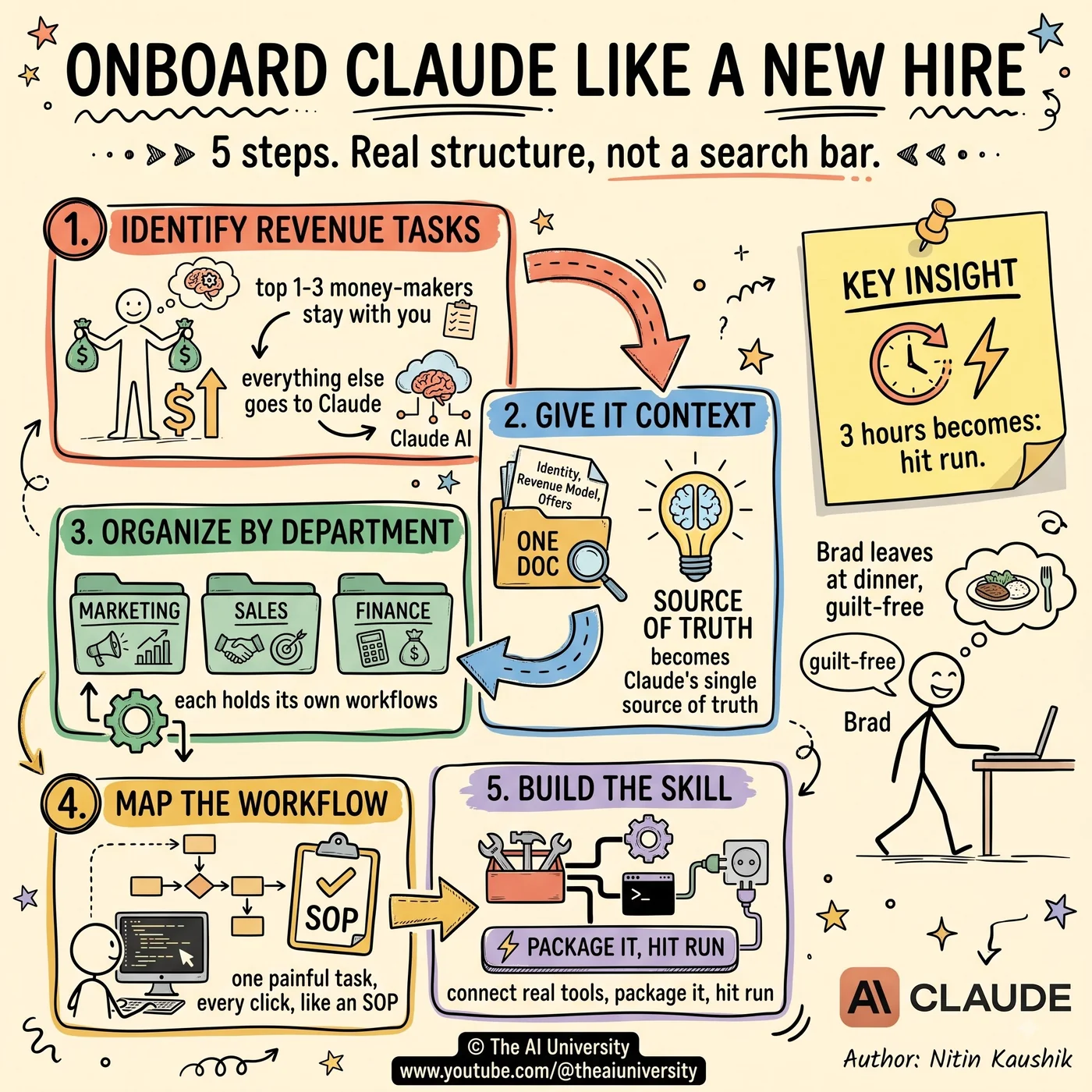
1. Identify revenue-generating tasks
Before anything is automated, you need to know what must not be.
List your top one to three activities that directly make you money — calls, content, whatever it is for you. These are the things where your personal involvement is the product, and delegating them is how businesses quietly get worse.
Then look at everything else. Everything that is time-consuming but non-revenue — that is what goes to Claude.
The reason this is step one rather than an afterthought: most people start automating whatever annoys them most, which is not the same list. The annoying task and the low-value task overlap, but not completely, and automating a revenue task because it is tedious is a real way to lose money efficiently.
2. Give it real context
A new employee does not start with a task. They start with an induction.
Write one document covering identity, revenue model, offer stack, team, market position, and 90-day priorities. Not a paragraph — the actual working picture of the business, the kind you would give a competent hire on day one so they could make decisions without asking.
Crucially, this becomes Claude’s single source of truth, not a one-off prompt. The difference is that a prompt is discarded after one conversation, while a source of truth is present in every conversation, forever, informing outputs you did not think to connect to it.
Almost every complaint about generic AI output traces back to this step being skipped. The model is not being generic; it is being given nothing specific.
3. Organize by department
Marketing, sales, finance — each one gets its own folder in Claude’s workspace.
Every workflow and output for that department lives in one place. That is the whole rule, and it does two things at once.
First, retrieval: the model knows where to look, so it stops searching and starts fetching. Second, and less obvious, it forces you to decide which department a piece of work belongs to — which is a clarifying exercise in itself, because work that fits nowhere is usually work nobody actually needs.
The org-chart framing is not decoration. Businesses organise by department because it works, and an AI workspace is subject to the same forces.
4. Map the workflow like an SOP
This is the step that does the real work, and it is the one that feels like a detour.
Pick one painful, non-revenue task and map every step from start to finish — like writing an SOP for a new employee. Not a summary. Every click, every decision, and examples of what success looks like versus what failure looks like.
The examples are the part people leave out and the part that matters most. “Produce a competitor brief” is not a specification. A good brief and a bad brief, side by side, with the difference articulated, is.
There is a side effect worth mentioning: writing the SOP frequently reveals that the process itself is bad. You cannot document a workflow honestly without noticing the steps that exist for no reason. Fix those first, then automate what remains.
5. Build the skill
Now the mapped workflow becomes something that runs.
Connect real business tools — email, calendar, CRMs, even VidIQ for YouTube — so the skill operates on live data instead of on what you remembered to paste. Then package the mapped workflow into a Skill that Claude runs on demand or on a schedule.
A concrete example: Brad’s “coffee competitor brief” Skill now runs his YouTube research while he is not even at his desk. The work still happens. He is not the one doing it, and he is not the one triggering it either.
That is the actual finish line — not faster work, but work that happens without you.
The part most people miss
Context and structure are what turn Claude from an AI into your hardest-working employee. Not better prompts. Not a bigger model. Not a longer conversation.
Three hours of competitor research becomes hitting run and getting it back in minutes — but only because the business context was written down, the workspace was organised, the process was documented, and the tools were connected. Skip any of those four and you are back to prompting.
The parallel to hiring holds all the way through. A new employee with no induction, no department, no SOP and no system access is not a bad employee. They are an unmanaged one, and the output looks exactly like ungrounded AI output does.
The formula
- Context = the brain.
- Departments = the org chart.
- Workflow maps = the SOP.
- Skills = the employee who never clocks out.
Frequently asked questions
What should you automate with Claude first?
Not the most annoying task — the most time-consuming non-revenue one. List your top one to three activities that directly make money and protect those; everything else that eats time without generating revenue is the automation candidate.
What goes in the context document?
Identity, revenue model, offer stack, team, market position and 90-day priorities — the working picture of the business you would hand a competent new hire. It becomes Claude’s single source of truth across every conversation, not a prompt used once.
Why organise a Claude workspace by department?
Marketing, sales and finance each get a folder holding every workflow and output for that function. It makes retrieval direct rather than a search, and it forces a decision about where each piece of work belongs — which usually exposes work nobody needs.
How detailed should a workflow map be?
As detailed as an SOP written for a new employee: every click, every decision, and examples of what success and failure look like. The examples are the part most people omit and the part that determines output quality.
What turns a documented workflow into a Skill?
Connecting real tools — email, calendar, CRMs, VidIQ for YouTube — and packaging the mapped process so Claude runs it on demand or on a schedule. Brad’s “coffee competitor brief” Skill runs his YouTube research while he is away from his desk.
Build it yourself
Everything written about here gets built in the open — the whole application, on camera, including the parts that did not work first time.
Keep reading
 open source SaaS alternatives
Open Source SaaS Alternatives: 5 Repos Worth Selling
Semrush charges $250. This costs ten.
Read article→ Claude AI side hustles
Claude AI Side Hustles: 5 That Fit Around a Full-Time Job
Claude AI side hustles work because your job already gave you the niche. Five that fit around full-time work, and the one thing that decides all five.
Read article→ agentic AI system design
Agentic AI System Design: 9 Layers That Break in Production
Agentic AI system design is backend engineering, not prompting. The nine layers that decide whether your agent survives production.
Read article→