
The 20% of AI skills that still work in ten years
Most people learning AI stall at level two without ever noticing. Here are the three levels, and the one that makes everything else compound.

If I started from zero today, I would learn only the part that still works in ten years.
Almost everything written about learning AI is about tools, and tools have a shelf life measured in months. The model you learn this quarter will be deprecated. The plugin you master will be absorbed into the platform. The prompt trick that works today stops mattering the moment the next model is good enough not to need it.
Underneath that churn there is a small set of skills that has not changed and shows no sign of changing — because they are about how you organise information and how you connect systems, not about which vendor you picked. That is the 20% worth learning. Here it is, in the order it actually compounds.
The short version
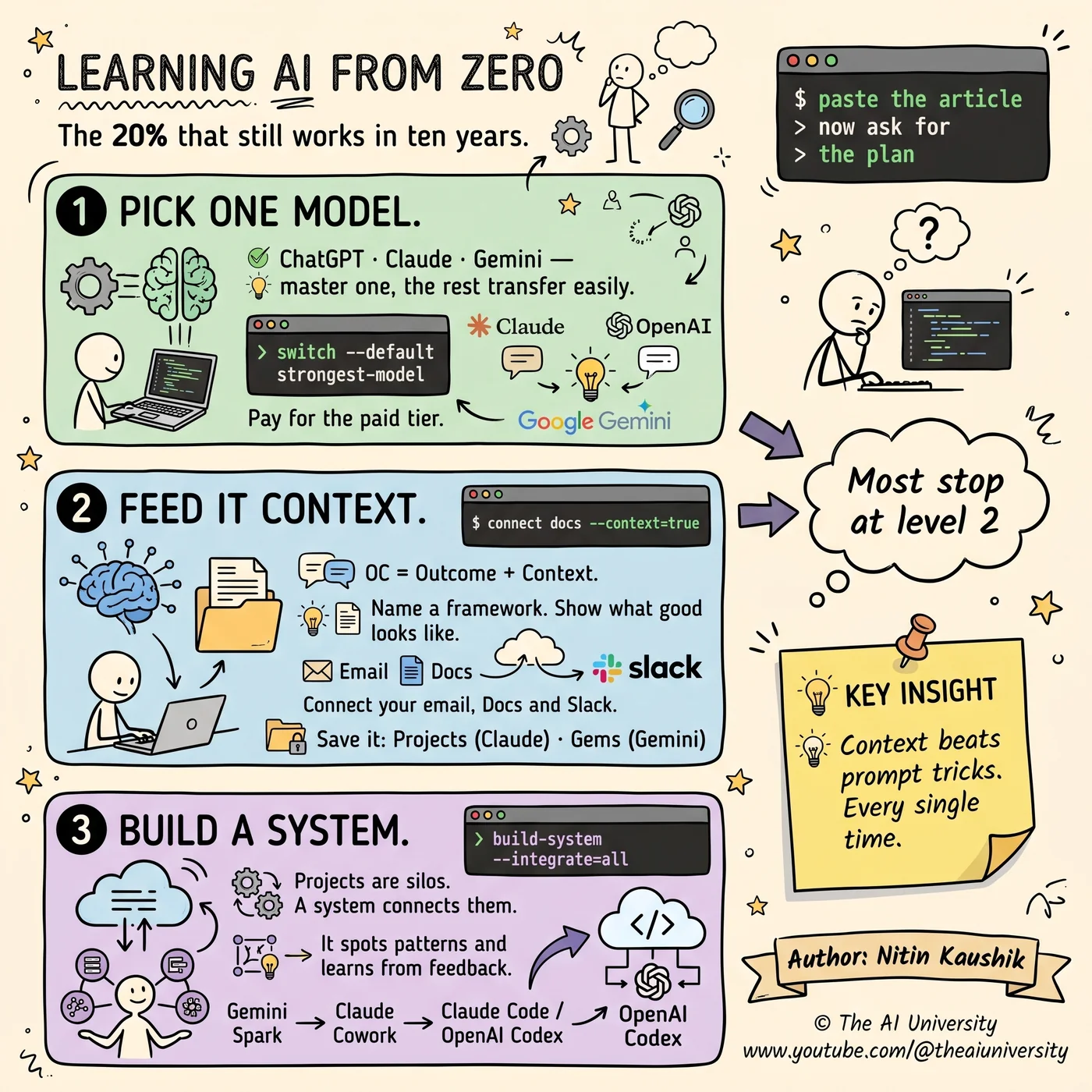
- Level 1 = master one chatbot.
- Level 2 = feed it context, then save it.
- Level 3 = connect projects into a system.
- Most people stall at level two without ever noticing, because level two feels like mastery.
1. Pick one model and go deep
Master ChatGPT, Claude or Gemini. Not all three. The core skills transfer between them, so the depth you build on one is not wasted when you move — but the depth itself only develops if you stay long enough to develop it.
Spreading yourself thin across every new tool feels like keeping up. In practice it keeps you permanently at the beginner tier of five products instead of the expert tier of one, and the expert tier is where all the leverage is.
Go deep on one. The transfer is real; the shallowness is not recoverable.
2. Choose it on three rules
Which one you pick matters less than people think, but there are three rules worth following.
- Pay for the paid tier. Free versions quietly cap what you can learn — fewer messages, weaker default models, missing features. You end up forming opinions about a limited version of the product and mistaking them for opinions about the product.
- Match it to your work. ChatGPT for research, Claude for writing and code, Gemini for mixed media and Workspace. These are tendencies, not laws, but starting from your actual daily work beats starting from a benchmark.
- Go with the vibes. You learn faster on the tool you enjoy using, and memory import makes switching cheap later. Enjoyment is a legitimate selection criterion when the alternative is not using it at all.
3. Change your default model
This is the single highest-return five seconds in this entire post, and almost nobody spends them.
Companies default you to cheaper models to control their costs. That is a rational business decision and it has nothing to do with what is best for your task. The default is a margin choice, not a quality recommendation.
Switch to the strongest model your plan allows. It catches nuance the cheaper tier misses and breaks down multi-step tasks properly instead of flattening them into one pass. Most people forming a low opinion of AI are forming it about a model that was chosen for them by a finance team.
4. Stop obsessing over prompts
Prompt engineering as a discipline was a response to models that needed careful handling. The models are good enough now that context beats prompt length and clever tricks, and the effort spent on incantations is better spent on inputs.
The formula that replaces it is short: OC — Outcome plus Context. Say what you want to end up with, and give it what it needs to know. That is the whole framework, and it is durable precisely because it is not a trick that a model update can invalidate.
5. Feed it the right context
Context is the skill. Everything else in this post is downstream of it. Three concrete moves:
- Paste the source, not the summary. Paste the article explaining push-pull-legs, then ask for a 4-day muscle growth plan. The model now reasons from the actual method rather than from its general impression of one.
- Name proven frameworks out loud. "Rewrite this using the pyramid principle." Naming a known structure is enormously more efficient than describing the structure you want in your own words.
- Show real examples of what good looks like, and connect your email, Docs and Slack so it can reach the material without you fetching it.
Notice that none of these is a prompt technique. They are all about what the model has access to, which is why they keep working as models change.
6. Save it in Projects
The natural next problem: once you learn to feed good context, you find yourself feeding the same context repeatedly.
Store rules, source files and live memory in one place so you stop repeating yourself. Claude calls them Projects. Gemini calls them Gems. Same idea, different name: a container that persists across conversations.
A workout project, for example, remembers your constraints and adapts when you say you are injured — rather than needing the whole history re-explained every session. That persistence is what converts a chatbot into something that accumulates.
7. Connect projects into a system
This is the step almost nobody takes, and it is the one that separates level two from level three.
Projects are silos. Each one is excellent at its own domain and blind to every other. A system reads across them and spots patterns you would miss, because the pattern only exists in the overlap.
A concrete example: merging checkups, supplements and workouts into one system exposed missing cardio days from cholesterol levels. No individual project could have found that — the health data was in one silo and the training schedule in another, and the insight lived between them.
A system also learns from your feedback, which means your workload shrinks instead of growing. That is the inversion worth working towards: most tools get more demanding as you add to them, and a well-built system gets less so.
8. Pick your system layer
There are three broad options, and they trade control against setup cost.
- Gemini Spark — beginner friendly, connects Google tools, least control. The fastest way to have something running.
- Claude Cowork — built for non-technical users, more control, some setup required. The middle path.
- Claude Code or OpenAI Codex — fully customisable, but you need to code. Highest ceiling, highest floor.
Pick by how much control you need and how much setup you can tolerate, not by which sounds most advanced. A system you actually finish configuring beats a more powerful one you abandon halfway.
The three levels
- Level 1 = master one chatbot.
- Level 2 = feed it context, then save it.
- Level 3 = connect projects into a system.
Most people stall at level two, and the reason is that level two feels complete. You are getting good answers, you have your Projects set up, the tool is genuinely useful. Nothing is obviously broken.
What is missing is invisible: the insights that only exist between your silos, and which you will never see because nothing is looking across them. That is the entire argument for level three, and it is why the skill still works in ten years — it is a skill about structure, not about a product.
Frequently asked questions
Which AI skills are actually durable?
The ones about organising information rather than operating a product: giving a model the right context, saving that context so it persists, and connecting separate contexts into a system that reads across them. Tools change; those three do not.
Should you learn ChatGPT, Claude or Gemini?
Pick one and go deep — the core skills transfer between all three. Choose on three rules: pay for the paid tier, match it to your actual work (ChatGPT for research, Claude for writing and code, Gemini for mixed media and Workspace), and pick the one you enjoy, since memory import makes switching cheap.
Why change the default model?
Because the default is a cost decision, not a quality one — companies default you to cheaper models to control their spend. Switching to the strongest model your plan allows catches nuance and breaks multi-step tasks down properly.
Is prompt engineering still worth learning?
Not as a discipline of tricks. Models are good enough now that context beats prompt length. The durable formula is OC: Outcome plus Context — say what you want to end up with, and supply what it needs to know.
What is the difference between a Project and a system?
A Project is a silo: rules, files and memory for one domain. A system reads across several projects and finds patterns that exist only in the overlap — for example, spotting missing cardio days by combining checkups, supplements and workout data. Projects make you faster; a system makes you see things.
Build it yourself
Everything written about here gets built in the open — the whole application, on camera, including the parts that did not work first time.
Keep reading
 AI agent skills
AI Agent Skills: 9 Free Ones and the Step Most Skip
AI agent skills install from one pasted link — that part is easy. The step that makes them genuinely useful is the one almost nobody runs.
Read article→ Jev decision model
Jev Decision Model: The AI That Can't Write, Only Decides
The Jev decision model can't write a word. Vercel and LangChain added it anyway. Why a "System One" classifier is 200x faster than the LLM in your agent.
Read article→ open source SaaS alternatives
Open Source SaaS Alternatives: 5 Repos Worth Selling
Semrush charges $250. This costs ten.
Read article→