
AI Agent Skills: 9 Free Ones and the Step Most Skip
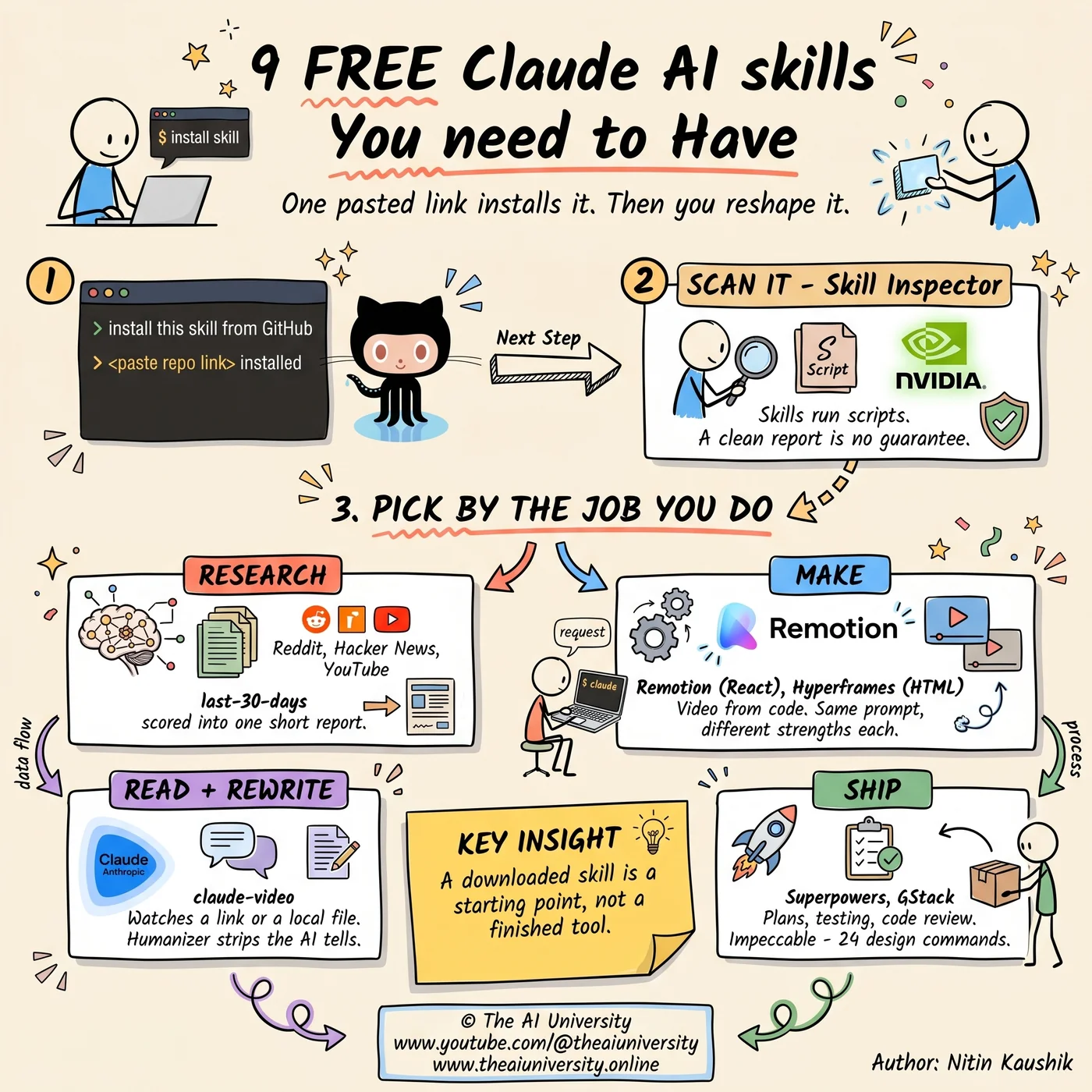
AI agent skills install from one pasted link — that part is easy. The step that makes them genuinely useful is the one almost nobody runs.

An AI agent skill is a packaged set of instructions that teaches an AI agent to carry out a specific task, or a fixed sequence of steps, the same way every time. Some skills are nothing more than written instructions. Others ship with scripts, reference material and the tools the agent needs to actually finish the job. The clearest way to hold the idea is a recipe card: the agent already knows how to cook, and the skill tells it what this dish is and in what order to make it. A lot of genuinely good ones are available free right now, and installing one takes about a minute.
What follows is nine of them, what each one is for, and the step that separates people who collect skills from people who get compounding value out of them.
What an AI agent skill actually is
An agent skill is a repeatable workflow definition that an AI agent loads and follows on demand. The distinction that matters is what gets packaged alongside the instructions. The simplest skills are text — a procedure written out clearly enough that the agent stops improvising. The more capable ones bundle executable scripts, reference documents and tool definitions, so the agent is not just told what to do but handed the means to do it.
Instruction-only skills versus skills that ship code
Instruction-only skills are the safest and the easiest to reason about, because everything they do is visible in plain language. Skills that ship scripts are more powerful and carry more risk, for exactly the same reason: something is going to execute on your machine. That difference is why the security step further down is not optional.
The skills here work across most agentic tools
Agent skills are broadly portable. The ones covered here are compatible across most agentic tools, including ChatGPT's work surface, Claude Code, Claude Cowork and Codex, as well as others in the same category. The install flow varies slightly between them, but not by much — the process is essentially identical in each, which is what makes it worth learning once.
How to install an agent skill from GitHub
You install an agent skill by pasting its GitHub repository link into your agent and asking it to install the skill using the repo's setup instructions. That is the whole process. GitHub is simply the platform people use to store code in the cloud, and it is where nearly all of these skills live — each repo's page also documents exactly what the skill does, which is worth reading before you install anything.
The prompt does not need to be elaborate. Something as plain as "install this skill from GitHub using its setup instructions", followed by the link, is enough. The agent works for a minute and reports back that the skill is installed.
Calling a skill once it is installed
Calling an installed skill takes an @ mention in most tools, which brings up a list you pick from. You often do not even need that. Mentioning the skill by name inside a normal prompt is usually enough for the agent to reach for it, and some tools will invoke a relevant skill purely from the context of what you asked, without you naming it at all.
Why you should scan a skill before you install it
Scanning a skill before installation matters because skills can include instructions, scripts and tools that your agent runs on your behalf. A malicious or simply poorly built skill could expose API keys or other sensitive data, or push the agent into taking actions you never intended. That risk is structural, not hypothetical — it comes directly from the thing that makes skills useful.
NVIDIA publishes a security scanner for exactly this, called Skill Inspector. It can itself be installed as a skill, so you point it at the link of whatever you are about to install and it returns a report on potential security risks. The report goes deep. It will sometimes flag things that are genuinely minor, and judging those is still your call.
The honest framing runs both directions. A flagged item does not automatically mean a skill is unsafe, and a clean report is not an absolute guarantee that everything is fine. What the scan buys you is a useful extra step when you are installing code written by someone you do not know — which, with skills, is most of the time.
The research skill: last-30-days
The last-30-days skill finds what people are actually saying about a topic right now, rather than what ranks well. Instead of leaning mostly on normal web search, it searches across YouTube transcripts, Reddit, Polymarket and other sources, then scores and filters everything and synthesises it into a short report. Additional sources, including X and YouTube, can be enabled during setup.
The output size is the quiet feature. One run on a newly released AI tool came back after five minutes with a digestible report rather than a wall of text, citing 14 Reddit threads and 13 Hacker News stories alongside GitHub, each openable with links to the original posts. A report you will read beats a comprehensive one you will not.
There is a real limitation worth knowing. The summary necessarily buries things, and the posts that do not make the summary are often the most interesting — which is precisely the gap the customisation step later in this article exists to close.
Making video with code: Remotion and Hyperframes
Remotion and Hyperframes both let an AI create video by writing code, and both ship skills that teach your agent how to drive them. The use cases overlap heavily: motion graphics, data visualisations, map animations, captions and more. The difference is the engine underneath. Remotion builds videos with React. Hyperframes uses HTML and web animations.
That difference in approach produces a real difference in strengths, and it shows up fastest if you run the same prompt through both. On a motion-graphics prompt — a centre icon with capabilities expanding outward from it — Remotion returned a smooth, usable animation and opened into what amounts to a full editing studio. On a 15-second map animation of a Utah national parks road trip, Hyperframes came back ahead: a smoother zoom in, a better camera angle and a cleaner zoom out, while Remotion followed the correct highways with good camera movement but added a disorienting spin at the start and end. Remotion even has a built-in remotion-maps skill, and still lost that particular comparison.
The practical conclusion is not to pick a winner. Install both, then test them against the work you actually make.
Watching and rewriting: claude-video and Humanizer
Two skills fix two different failure points in ordinary AI work: one lets the model see video, the other stops its writing from sounding like AI.
The claude-video skill lets ChatGPT and Claude watch videos, and despite the name it works in Codex too. It accepts either a link or a local file. During installation it asks whether you want to add an API key so it can generate a transcript from the audio when a video has no captions of its own — that fallback is the only paid part, and the skill is completely free if you skip it.
The gap it closes is wider than it sounds. Pointed at an Instagram video of a camping meal where the ingredients were in the description but the instructions appeared only on screen, the skill returned the full recipe including the on-screen timings. Dropped into a chat without the skill, the same link failed immediately because the model could not view the video at all. Hand it the raw video file and it will extract frames and work out the recipe, but it will not generate a transcript without a round or two of extra prompting. The skill has all of that built in, so it just works — including downloading a video itself when it cannot view it on the site.
Humanizer attacks the other problem: AI slop in writing. The more you use AI, the more visible its tells become — the "most X don't need Y, they need Z" construction, the manufactured closing line that lands like a mic drop. Run a draft through Humanizer and it reworks those, then shows you what it changed and why. It works on short text, but it earns its place on long-form writing, where the tells accumulate.
The build stack: Superpowers, GStack and Impeccable
Three skills cover the build side, and they stack rather than compete.
Superpowers is a collection that enhances the whole development process — brainstorming, writing plans, implementing features, testing, debugging. You can invoke specific parts yourself, but once it is installed the pieces often get called automatically, guiding the agent as it works. It behaves less like a tool and more like a development playbook the agent consults throughout a project.
GStack is another collection, built and maintained by Y Combinator's CEO, aimed at the jobs involved in building and shipping software. Some of its skills challenge a product idea or review a technical plan; others handle design, code review, browser testing, bug fixes and releases. Its capabilities partly overlap with Superpowers, and a lot of them do not, which is a reasonable argument for running both.
Impeccable targets AI design slop. AI can produce genuinely impressive designs now, but use it enough and the tells become as recognisable in interfaces as they are in text. Impeccable currently ships 24 commands for critiquing a design, amplifying boring ones, adding purposeful motion, adjusting typography and layout, and making an interface clearer or more distinctive.
What that looks like in practice: a plain, clean but restrained site built from a single prompt, run through the bolder command, came back with stronger typography, deep forest green sections and larger images. The delight command added a stamp-press animation on a user action. The critique command produced a full review covering the design, the functionality as a user would actually experience it, and the responsiveness between desktop and mobile, with concrete fixes attached. For anyone building websites, apps or landing pages with AI, that last one is the fastest way to raise the quality of a design.
(https://github.com/obra/superpowers) and
Here is the full set in one place:
Skill | The job it does |
|---|---|
last-30-days | Finds what people are actually saying about a topic right now |
Skill Inspector | Scans a skill for security risks before you install it |
Remotion | Builds video from code, using React |
Hyperframes | Builds video from code, using HTML and web animations |
claude-video | Lets the agent watch a video from a link or a local file |
Humanizer | Strips the AI tells out of a draft |
Superpowers | A development playbook the agent consults as it works |
GStack | Product critique, technical review, design, code review, testing, releases |
Impeccable | 24 commands aimed at AI design slop |
The step most people skip: customising the skill
The highest-value step with any agent skill is the one that comes after installation: reshaping it into your own version. A downloaded skill does not have to be used as-is. It is a starting point, and skills work considerably better once they are customised to your specific setup and preferences.
The pattern is three moves. Run the skill and look hard at what it produced. Reshape that output until it fits the format and the level of detail you actually want — which usually means several rounds of checking that the connection works and the formatting holds. Then ask the agent to package everything up as a new, expanded skill.
The research skill is the clearest example of why this pays. Its summary is deliberately compact, which is a feature, but it means useful material gets buried — including the unconventional takes, which are frequently the most valuable part. In one run, the buried layer was the observation that a tool marketing itself on having zero hallucinations is not making the same claim as having no errors, a distinction most of the coverage had glossed over entirely. Surfacing that reliably is not something the stock skill does. It is something a customised version does.
The bigger shift
The interesting thing about agent skills is not any individual skill on the list. It is that the unit of AI work is quietly moving from the prompt to the packaged workflow. A prompt is something you rewrite every time. A skill is something you install once, scan, run, reshape and keep — and the version you keep gets better the more specific it becomes to how you work.
That is also why the advice to start with what you already do holds up better than the advice to install everything. Pick the skills that touch work you genuinely repeat, try them on real tasks rather than demos, and customise from there. The free download gets you to the starting line. What you build on top of it is the part nobody else has.
Frequently asked questions
What is an AI agent skill?
An AI agent skill is a packaged set of instructions that teaches an AI agent to perform a specific task or sequence of steps in a repeatable way. Some skills contain only written instructions. Others include scripts, reference material and the tools the agent needs to complete the job. A useful comparison is a recipe card for a workflow — the agent supplies the general capability, and the skill supplies the specific procedure and its order.
Do I need to code to install an agent skill?
No, you do not need to write code to install an agent skill. The entire process is pasting the skill's GitHub repository link into your agent and asking it to install the skill using the repo's setup instructions. The agent reads those instructions and handles the setup itself, usually within a minute. GitHub is just where the code is stored, and you only need the link to the page, not any understanding of what is in it.
How is a skill different from a prompt?
A skill is a packaged, reusable workflow; a prompt is a single instruction you write out each time. The practical difference is repeatability and payload. A prompt lives in one conversation and has to be rewritten or pasted again on the next job. A skill is installed once, can be invoked by name or picked up automatically from context, and can carry scripts, reference files and tools alongside its instructions.
Are agent skills safe to install?
Agent skills carry real risk, because they can include instructions, scripts and tools that your agent executes on your behalf. A malicious or poorly built skill could expose API keys or sensitive data, or cause the agent to take unintended actions. NVIDIA's Skill Inspector scans a skill and reports potential security risks before you install it. A clean report is not an absolute guarantee and a flag is not an automatic rejection, but scanning is a worthwhile extra step.
What does Skill Inspector actually check?
Skill Inspector is a security scanner from NVIDIA that examines a skill for potential security risks before you run it. It produces a detailed report on what the skill contains and what it could do, covering the instructions, scripts and tools bundled inside. In practice it will sometimes flag items that are fairly minor, so the report is input to your judgement rather than a verdict — the decision to install still sits with you.
Which is better for AI video, Remotion or Hyperframes?
Neither is better across the board, because they use different engines and have different strengths. Remotion builds videos with React and opens into a full editing studio. Hyperframes uses HTML and web animations. On a head-to-head map animation, Hyperframes produced better aesthetics, a smoother zoom and a preferable camera angle, while Remotion was stronger on a motion-graphics prompt. Installing both and testing them on your own work is the reliable way to choose.
Build it yourself
Everything written about here gets built in the open — the whole application, on camera, including the parts that did not work first time.
Keep reading
 Jev decision model
Jev Decision Model: The AI That Can't Write, Only Decides
The Jev decision model can't write a word. Vercel and LangChain added it anyway. Why a "System One" classifier is 200x faster than the LLM in your agent.
Read article→ open source SaaS alternatives
Open Source SaaS Alternatives: 5 Repos Worth Selling
Semrush charges $250. This costs ten.
Read article→ Claude AI side hustles
Claude AI Side Hustles: 5 That Fit Around a Full-Time Job
Claude AI side hustles work because your job already gave you the niche. Five that fit around full-time work, and the one thing that decides all five.
Read article→