
Obsidian + Claude Code: Build Your Own AI Command Center
Most people run Claude Code in Obsidian just to track markdown files. Here's the dashboard, skills, memory and voice layer they're missing.

Most people run Claude Code inside an Obsidian vault to do one thing: keep markdown files tidy. Rename, reorganise, summarise, move on. That is a text editor with an assistant bolted on, and it wastes almost everything the combination can do.
Claude Code can turn an Obsidian vault into a full operating system for your work: a dashboard that shows every number you care about, skills you fire with one click, an organised memory layer, and local voice control that answers out loud.
Here is the full breakdown — layer by layer, in the order they actually need to be built.
The short version
- Skills are what it can do. Memory is what it can find. Dashboard is what you can see. Voice is how you reach it.
- The dashboard is the last layer, not the first. A command center with no skill backbone is a pretty face with nothing behind it.
- Everything starts from the work you already do by hand every day.
1. The command center
The visible layer is a single Obsidian plugin, written by Claude Code, that holds every metric you care about in one place.
Token usage. Calendar. Social numbers. Daily reports. Research summaries. One screen, one glance, no tab-switching between six services that each own one number.
The reason this belongs in Obsidian rather than in a separate app is that the vault is already where the work lives. The notes, the research, the drafts and the outputs are all in the same directory the dashboard reads from, so nothing has to be synced anywhere.
Build it last. It is the surface of the system, and a surface with nothing underneath it is a demo.
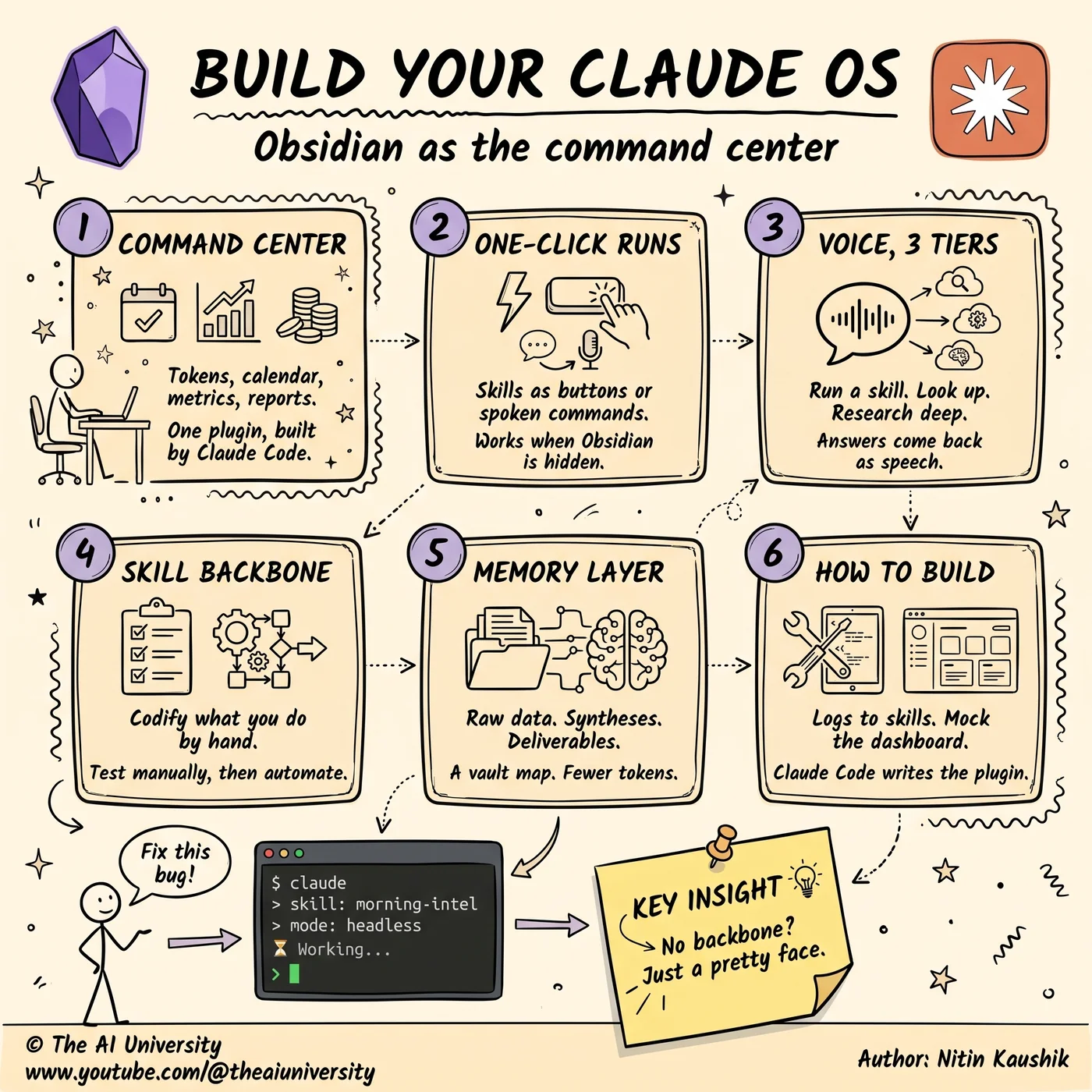
2. One-click runs
Once the skills exist, every one of them becomes a button on the dashboard — or a spoken command.
The point is to remove the terminal from the daily loop. Firing a morning intel report should not require remembering a command, opening a shell, and typing a path. It should be a button you press with coffee in the other hand.
This sounds cosmetic. It is not. The difference between a workflow that takes four deliberate steps and one that takes a single click is the difference between something you run every day and something you ran twice in March.
3. Voice, in three tiers
Voice is the layer that makes the system reachable when you are not sitting at the keyboard, and it works best when it is split by how much work the request actually requires.
- Tier one runs a skill. Short, deterministic, immediate.
- Tier two looks up an existing report. No new work — just retrieval from what has already been generated.
- Tier three runs deep research headlessly, in the background, and comes back when it is done.
Answers come back as speech, and it works even when Obsidian is not the active window. That last detail is what turns it from a novelty into something usable: the system does not require you to be looking at it.
The three-tier split matters because it sets expectations. A tier-one request answers instantly. A tier-three request is a job you hand over and walk away from. Collapsing them into one undifferentiated "ask it anything" interface makes every request feel slow.
4. The skill backbone
This is the layer everything else stands on, and it is the one people skip because it is the least fun.
Start by listing what you already do by hand. Research scanning. Social metrics. Scheduling. The recurring, tedious, non-creative work that eats an hour a day and produces the same shape of output every time.
Then codify each one into a deterministic skill — a defined sequence with defined inputs and a defined output, not a prompt you re-improvise every morning. Test it manually first, then automate it. A skill that has never been run by hand is a guess about a workflow you have not actually described.
Deterministic is the load-bearing word. The value of a skill is that it produces the same shape of result every time, which is what makes the output trustworthy enough to act on without reading it closely.
5. The memory layer
An AI system that cannot find things is an AI system that re-derives them, expensively, every time. The fix is not more memory. It is organised memory.
Three tiers work well:
- Raw data — the unprocessed inputs: transcripts, exports, scraped pages, notes.
- Wiki-style syntheses — the distilled version, cross-linked, written to be read again.
- Finished deliverables — the outputs that went somewhere: the published post, the sent report, the shipped brief.
On top of that, give Claude Code a map of your vault. When the model knows where things live, it stops searching and starts retrieving — which burns dramatically fewer tokens on every single run.
That token saving is not a rounding error. Retrieval cost is paid on every request forever, so an hour spent organising the vault pays back continuously in a way almost nothing else in this stack does.
6. How to build it
Two ways to start, and they work equally well:
- Talk through your daily workflows. Describe out loud what you do each morning, in order, including the parts you consider too obvious to mention. Those are usually the automatable ones.
- Read your own Claude Code logs. The things you have already asked for repeatedly are, by definition, the workflows worth codifying. The log is a list of skills you have not written yet.
For the dashboard itself: mock it visually first, then let Claude Code generate the plugin from the mock. Describing a layout in prose is slow and lossy; showing a picture of it is neither.
Add hot reload so the plugin refreshes as it is edited, and you are done. Without it, every small change costs a restart, and the iteration loop gets slow enough that you stop iterating.
The part most people skip
A command center without a skill backbone is a pretty face with nothing behind it.
The dashboard is the last step, not the first. It is also the most photogenic step, which is exactly why people build it first and then discover there is nothing meaningful to display on it.
Start with what you actually do every day. Codify one workflow. Run it manually until it is reliable. Then automate it, then give it a button, then give it a voice. In that order.
The whole system in four lines
- Skills = what it can do.
- Memory = what it can find.
- Dashboard = what you can see.
- Voice = how you reach it.
Frequently asked questions
What can Claude Code do in Obsidian beyond managing markdown?
It can write an Obsidian plugin that acts as a dashboard for every metric you track, expose your workflows as one-click or spoken commands, organise the vault into a retrievable memory layer, and run deep research headlessly in the background. The markdown management most people use it for is the smallest piece.
Which layer should you build first?
The skill backbone. List the things you already do by hand, codify each one as a deterministic skill, and test it manually before automating it. The dashboard is the last layer — it displays what the skills produce, so building it first leaves you with an empty screen.
How does the memory layer reduce token costs?
By replacing search with retrieval. Splitting the vault into raw data, wiki-style syntheses and finished deliverables, and giving Claude Code a map of that structure, means it goes directly to the right file instead of scanning to find it. Fewer tokens are spent locating context on every single run.
What are the three voice tiers for?
They match the response to the work required. Tier one runs a skill. Tier two looks up an existing report. Tier three runs deep research headlessly in the background. Answers come back as speech, and it works even when Obsidian is not the active window.
How do you know which workflows to automate?
Two sources. Talk through your daily routine out loud and listen for the repetitive parts, or read back your own Claude Code logs — anything you have asked for repeatedly is already a skill in everything but name.
Build it yourself
Everything written about here gets built in the open — the whole application, on camera, including the parts that did not work first time.
Keep reading
 AI agent skills
AI Agent Skills: 9 Free Ones and the Step Most Skip
AI agent skills install from one pasted link — that part is easy. The step that makes them genuinely useful is the one almost nobody runs.
Read article→ Jev decision model
Jev Decision Model: The AI That Can't Write, Only Decides
The Jev decision model can't write a word. Vercel and LangChain added it anyway. Why a "System One" classifier is 200x faster than the LLM in your agent.
Read article→ open source SaaS alternatives
Open Source SaaS Alternatives: 5 Repos Worth Selling
Semrush charges $250. This costs ten.
Read article→