
Claude Settings: The 6 Dials That Change Every Answer
Six Claude settings sit in plain sight, and most people change none of them. Here's what each dial does, and when to spend on it.

Claude is not average. Your settings are.
Six dials sit in plain sight inside the app, and most people touch one of them — the model picker — and only when something goes wrong. The other five sit at their defaults for months, quietly deciding how good every answer is.
None of them is hidden. None of them requires a plan upgrade to find. Here is what each one does, and, more importantly, when it is worth spending on.
The short version
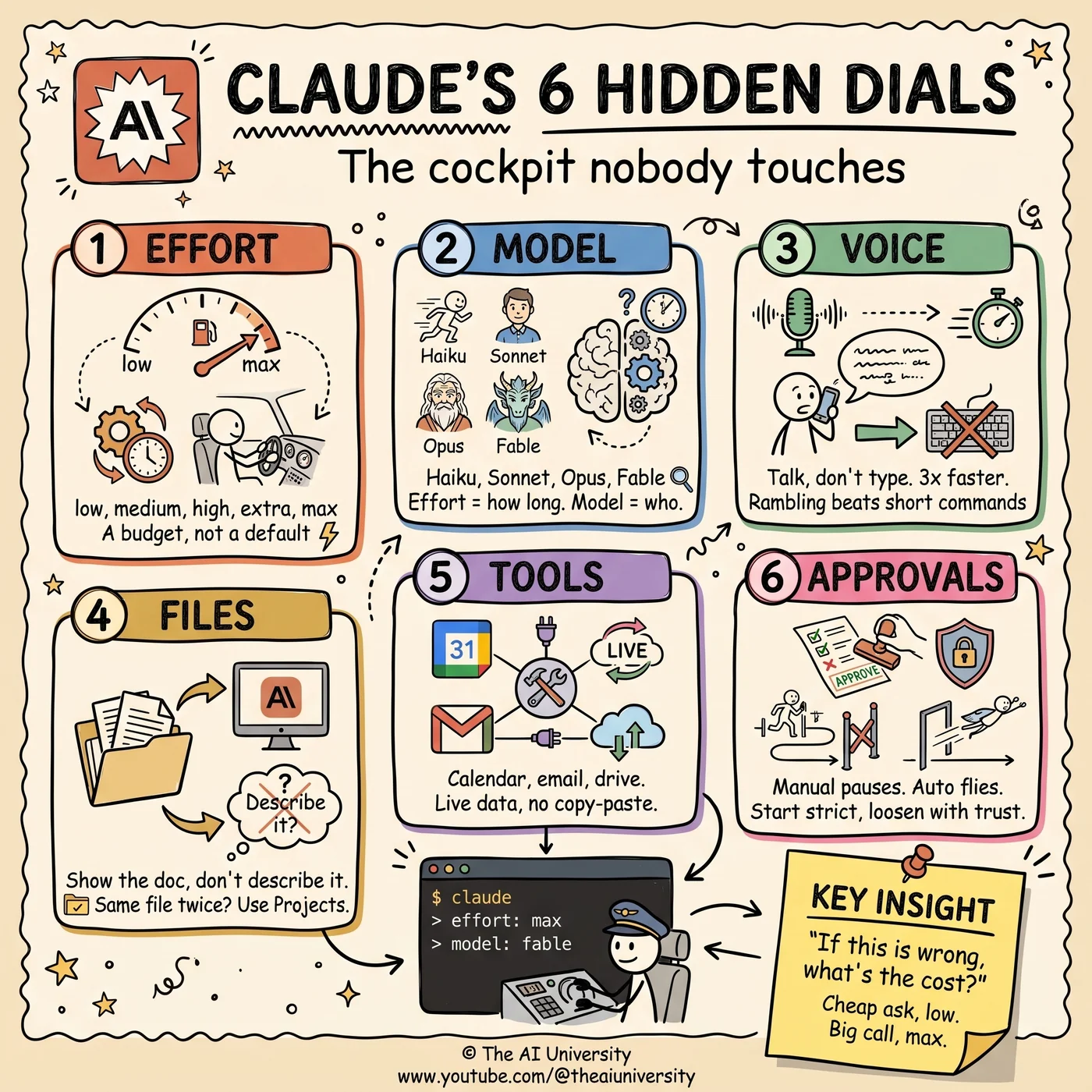
- Effort = how long it thinks. Model = who is thinking.
- Voice and files = what it knows. Tools = what it can reach. Approvals = how far it goes alone.
- Before you send anything, ask one question: if this answer is wrong, what does it cost me?
1. The effort dial
Bottom right of the input box. Five levels: low, medium, high, extra, max.
It controls how hard Claude thinks before it answers. The crucial thing to understand is that it is a budget, not a default — effort costs time and it costs usage limits, so leaving it at max permanently is not "always getting the best answer," it is spending your allowance on tasks that did not need it.
A working rule:
- Low for shortening text, reformatting, and anything where you already know what the output should look like.
- Medium for first drafts — the bulk of ordinary work.
- Max for costly mistakes: the contract clause, the architecture decision, the thing you will build on top of for six months.
The dial is most valuable precisely where people forget it exists — on the expensive question asked in a hurry.
2. Model choice
Top half of that same menu: Haiku, Sonnet, Opus, Fable.
People conflate this with the effort dial, and they are genuinely different axes. Effort is how long it thinks. Model is who is thinking. A small model thinking hard and a large model thinking briefly are not interchangeable, and they fail in different ways.
Reach for Haiku when you already know the answer and just need it typed out, formatted or checked. Reach for Fable for your hardest calls — the ones where you are genuinely unsure and the cost of being wrong is real.
Everything in between is the daily middle, and the middle is where most work lives.
3. Voice input
The microphone. Overlooked because it looks like a convenience feature, and it is not.
Two things it changes. First, the obvious one: it moves about three times faster than your typing. Second, and far more important: it changes what you are willing to say.
When you type, you edit as you go. You compress. You leave out the background because writing it feels like effort. When you speak, you ramble — and messy, complete context gives Claude better clues than a tidy command does. The unstructured version of a problem usually contains the constraint that mattered, the one you would have trimmed out of a well-written prompt.
So use it deliberately: talk through the whole situation, badly, and let the model do the tidying.
4. Attach files
Upload the contract, the spreadsheet, the screenshot. Claude reads the actual file rather than your summary of it — which removes an entire category of error where the thing you left out of your description is the thing that mattered.
The upgrade most people miss: if you find yourself uploading the same file every week, move it into Projects instead. A file in a Project is available to every conversation in that Project without being re-attached, which turns a repeated chore into a standing piece of context.
That is the general pattern with this dial — attaching is for one-off documents, Projects are for the ones that define your work.
5. Connect your tools
Next to the plus sign: calendar, email, drive.
Connecting them means Claude pulls live data instead of waiting on your copy-paste. The difference is not convenience. It is that the model can answer questions you could not previously ask without doing the retrieval yourself first — which meant you had to already know where to look.
A connected calendar turns "when am I free" into a question rather than a lookup. A connected drive means the reference document is available without you remembering which folder it is in.
6. Auto approvals
Left of the input box. Manual pauses for you at each step. Auto keeps moving.
The right mental model is a new hire. Start strict, loosen as trust grows. Watch what it does on a class of task, and once it has done it correctly several times, stop watching that class of task.
Full auto from day one is how people end up with a result they do not understand and cannot verify. Full manual forever is how people conclude the tool is slower than doing it themselves. The setting is meant to move.
The part most people skip
Effort costs time and usage limits. That makes the dial a spending decision, and spending decisions need a rule.
Here is the rule. Before you send anything, ask one question:
If this is wrong, what does it cost me?
Cheap question, low effort. Expensive decision, max and Fable.
That single question resolves the model choice, the effort level, whether it is worth attaching the source document, and whether you should be watching each step. It is the only piece of prompt strategy in this post, and it does more work than all the others.
The whole cockpit in five lines
- Effort = how long it thinks.
- Model = who is thinking.
- Voice and files = what it knows.
- Tools = what it can reach.
- Approvals = how far it goes alone.
Frequently asked questions
What is the difference between the effort dial and the model picker?
Effort is how long Claude thinks; model is who is thinking. They sit in the same menu — model choice on the top half, effort at the bottom right of the input box — but they are independent. A small model on high effort and a large model on low effort behave very differently and fail in different ways.
Should you always use maximum effort?
No. Effort is a budget, not a default: it costs time and usage limits. Use low for shortening and reformatting, medium for first drafts, and max for decisions where a wrong answer is expensive. The deciding question is what it costs you if the answer is wrong.
Why does voice input produce better answers than typing?
Because of what you are willing to say. Speaking runs roughly three times faster than typing, but the real gain is that you ramble — and messy, complete context gives Claude better clues than a tidy, compressed command. The detail you would have edited out is often the one that mattered.
When should you use Projects instead of attaching a file?
As soon as you find yourself uploading the same file more than once. Attaching is for one-off documents. Projects hold the files, rules and context that define your ongoing work, so every conversation in the Project already has them.
How should you set auto approvals?
Treat it like a new hire: start strict and loosen as trust grows. Watch a class of task until it has been done correctly several times, then stop watching that class. The setting is meant to change over time, not to be picked once.
Build it yourself
Everything written about here gets built in the open — the whole application, on camera, including the parts that did not work first time.
Keep reading
 AI agent skills
AI Agent Skills: 9 Free Ones and the Step Most Skip
AI agent skills install from one pasted link — that part is easy. The step that makes them genuinely useful is the one almost nobody runs.
Read article→ Jev decision model
Jev Decision Model: The AI That Can't Write, Only Decides
The Jev decision model can't write a word. Vercel and LangChain added it anyway. Why a "System One" classifier is 200x faster than the LLM in your agent.
Read article→ open source SaaS alternatives
Open Source SaaS Alternatives: 5 Repos Worth Selling
Semrush charges $250. This costs ten.
Read article→