
AI Voice Agent: How to Build One With No Code on ElevenLabs
An AI voice agent answered every course, fee and admission question I asked. Here is the five-step no-code build, and what people charge to install it.

An AI voice agent is software that picks up the call, answers the question, books the slot and updates the record — with no person in the loop. I spent an afternoon building one on ElevenLabs, with no coding at all, and by the end of it the agent was fielding questions about courses, fees and admissions the way a trained human rep would. My honest read is that most sales calls will be handled by AI voice agents within a few years. That is not a science-fiction prediction. The tooling to build one is already sitting in front of you, and it takes about as long as a decent lunch break.
What follows is the whole build, step by step, plus the part almost nobody explains properly: what this is actually worth once it works.
What an AI voice agent actually does
The most useful way to think about an AI voice agent is not as a chatbot with a voice bolted on. It is closer to a digital employee — a role you define, staff and deploy, rather than a feature you switch on.
The four jobs it takes over
A voice agent handles four kinds of work straight out of the box:
Books appointments — it takes the call, finds the slot, and confirms it
Answers customer queries — the same twenty questions your team answers every day
Updates CRM systems — so the record reflects the conversation without anyone retyping it
Sends emails — the follow-up that usually gets forgotten at 6pm on a Friday
Individually, none of those is glamorous. Together they are most of what a front-line rep does on a normal day.
Why businesses are adopting it now
The reason this is spreading quickly is not that the agent is smarter than a person. It is that it acts exactly like a human rep while taking the repetitive work off the roster, and it does that around the clock. A human rep answers the fees question fifty times a week and gets slower each time. An agent answers it the ten-thousandth time exactly as it answered it the first. Businesses are adopting AI voice agents rapidly for that single reason: it is a straight productivity gain on work that was never a good use of a human.
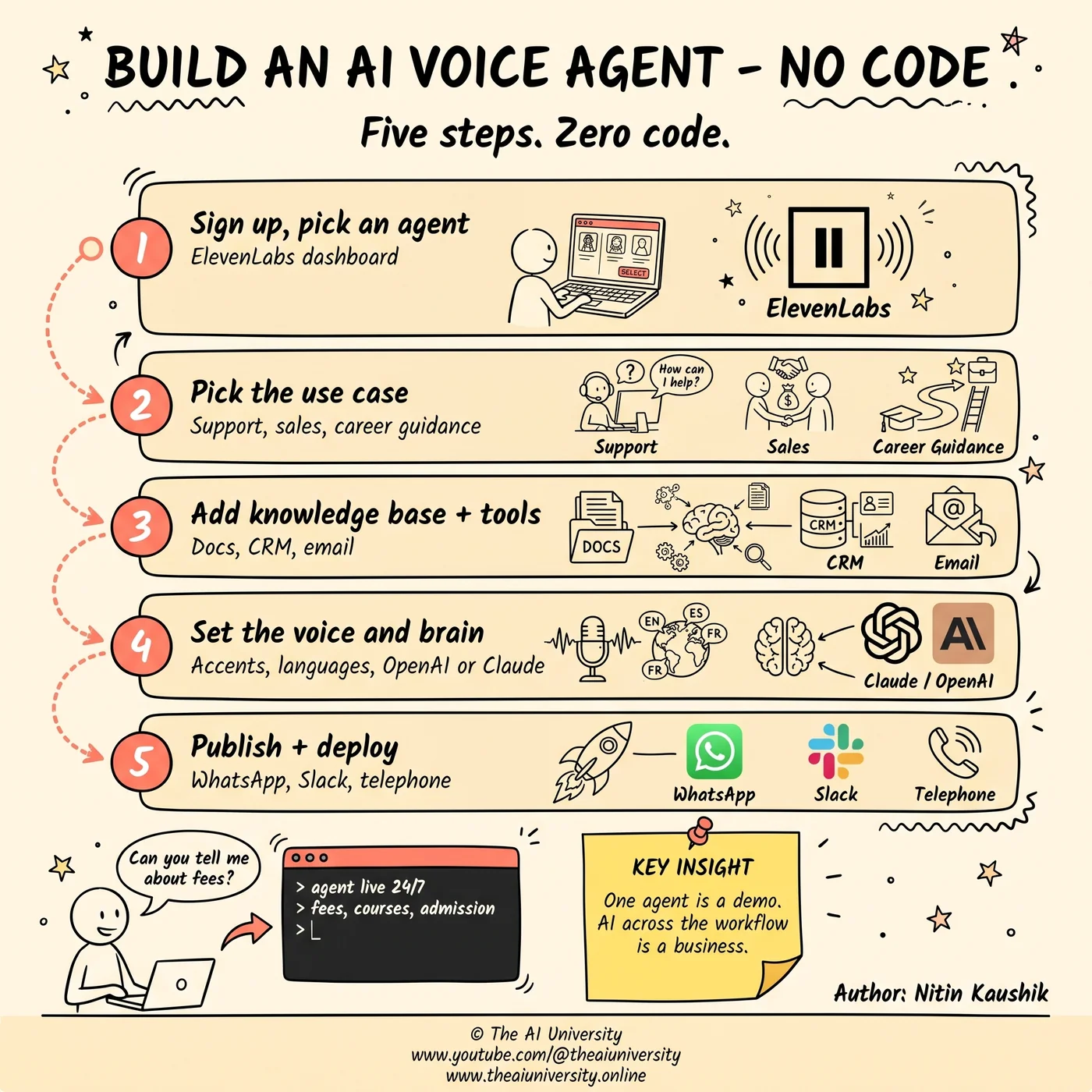
Step one: sign up and choose a business agent
The build starts on ElevenLabs. You sign up, and the first real decision is choosing a business agent rather than a general-purpose one. That choice matters more than it looks, because it sets the frame for everything after it — a business agent is scoped to represent an organisation, which is what makes the later steps (knowledge base, tools, deployment channels) coherent rather than a pile of settings.
Step two: pick the use case
Next you select the use case. ElevenLabs gives you concrete options rather than a blank canvas, and the three worth knowing are:
Customer support — inbound, reactive, high volume
Outbound sales — the agent initiates
Career guidance — advisory, question-led
Pick the one that matches the job you are actually staffing. This is the step people rush, and it is the one that quietly determines whether the agent sounds like it belongs to your business or like a demo.
Step three: add a knowledge base and tools
This is where an AI voice agent stops being generic and starts being yours. It comes in two halves, and they do different things.
Knowledge base documents give it context
You upload documents — the material that describes your business. This is what the agent answers from. Without it, the agent is a well-spoken stranger guessing at your pricing. With it, the agent knows your courses, your fees and your process, because you handed it the same documents you would hand a new hire on day one.
Tools give it the ability to act
Tools are the integration layer. They are what let the agent do something rather than just say something — reach into a system, take an action, and come back. Knowledge base without tools gives you an agent that can explain. Tools without a knowledge base gives you an agent that can act but has nothing accurate to act on. You want both.
Step four: customise the voice, and pick the brain
Two settings, and they are genuinely independent of each other.
Voice, language and accent
You customise the agent's voice, with multiple language and accent options available. For a business serving more than one region this is not cosmetic — an agent that answers in the caller's language and a familiar accent gets treated as staff rather than as an automated system, and it is a dropdown, not a project.
Choosing the LLM
Separately, you pick the LLM model behind the agent: OpenAI, Claude or Google. This is the reasoning layer — how the agent thinks about what it has been asked, as distinct from how it sounds saying the answer. The fact that it is a swappable choice rather than a fixed dependency is one of the better things about building an AI voice agent on a platform like this: you are not locked to one provider's model behaviour.
Step five: publish and deploy
Finally you publish, and deploy on channels — WhatsApp, Slack, or a telephone line.
That list is the part worth sitting with. Deployment is not "we built an app, now please download it." The agent goes where the conversation already happens. A clinic's patients already have WhatsApp. A company's staff are already in Slack. Everyone, everywhere, already has a phone. There is nothing to install and no new habit to teach anyone, which removes the single most common reason internal tools go unused.
What happened when I tested my own agent
I built a career guidance agent and then tried to break it. I asked it about courses. I asked it about fees. I asked it about admission.
It answered all of it — cleanly, in context, the way a real human agent would have. That test is the reason I stopped treating this as an interesting demo. The gap between "impressive" and "usable" in AI tooling is usually enormous; here, for a well-scoped advisory role with a good knowledge base behind it, there wasn't one.
Turning an AI voice agent into a service business
Building one for yourself is where most people stop. It is not where the money is. Every small business that answers the same questions all day is a customer for this, and almost none of them will build it themselves.
What people charge
Setup fees run from 15,000 to 1,00,000+ INR, with a monthly maintenance fee on top. That shape matters more than the numbers: a one-off build fee plus a recurring retainer is a service business, not a freelance gig. You are paid to stand it up, and paid again to keep it working.
Which industries buy it
The demand sits in businesses with high query volume and thin staffing:
Local businesses — medical clinics and spas
Education
Real estate
E-commerce stores
Freelancing platforms
Agencies
What you actually sell
The services range across appointment booking, lead qualification, order tracking, custom agent development, and automation consulting. Note how that list escalates. Appointment booking is a task. Automation consulting is a relationship. The first one gets you in the door at a clinic; the last one is what makes the account worth having.
What to build first if you want to learn this properly
Build the agent for a business you already understand before you build one for a client. The five steps take an afternoon, and the parts that are genuinely hard — scoping the role, deciding what belongs in the knowledge base, working out which actions need a tool rather than an answer — only get hard when the subject matter is real. A career guidance agent built against real course, fee and admission documents teaches more than a generic support demo, because the questions you use to try to break it are questions you already know the right answers to.
That is also the cheapest way to build the thing you sell on. A working agent you can demonstrate, with the knowledge base and tool wiring visible behind it, is a better pitch to a clinic or a real estate office than any description of what an AI voice agent could do for them.
The bigger shift: one agent is not the win
Here is the part most people miss, and it is the reason I would not want this article to end at step five.
A single voice agent is not enough. It is a demo — a good one, a genuinely useful one, but a demo. The real unlock is AI embedded across the entire workflow: sales, marketing, support, and content creation, all of it. One agent automates a task. AI across the workflow automates a business process, and those are different orders of magnitude.
That is also why the skill compounds. Once you understand how an AI voice agent is assembled — a scoped role, a knowledge base for context, tools for action, a model for reasoning, a channel for delivery — you are holding the pattern for automating almost anything else in the business. It's just the first place it becomes obvious.
This is not the future. It is happening now, and mastering AI voice agents is going to be a vital skill for businesses and creators alike.
Frequently asked questions
Is an AI voice agent just a chatbot with a voice?
No — an AI voice agent is closer to a digital employee than to a chatbot with a voice bolted on. It is a role you define, staff and deploy rather than a feature you switch on. Out of the box it books appointments, answers customer queries, updates CRM records and sends follow-up emails, which together is most of what a front-line rep does on a normal day.
Do you need to know how to code to build an AI voice agent?
No, the entire build described here was done on ElevenLabs with no coding at all. The five steps are sign-up and choosing a business agent, picking the use case, uploading a knowledge base and connecting tools, customising the voice and selecting the LLM, then publishing and deploying to a channel. Each one is a form or a dropdown. The afternoon it takes is spent on scoping decisions, not on syntax.
What is the difference between a knowledge base and tools in a voice agent?
A knowledge base is what the agent answers from; tools are what let it act. Knowledge base documents are the material describing your business — courses, fees, process — the same documents you would hand a new hire on day one. Tools are the integration layer that reaches into a system and takes an action. Knowledge base without tools gives you an agent that can only explain; tools without a knowledge base gives you one with nothing accurate to act on.
How much do people charge to build an AI voice agent?
Setup fees for an AI voice agent run from 15,000 to 1,00,000+ INR, with a monthly maintenance fee on top. The shape of that matters more than the numbers: a one-off build fee plus a recurring retainer makes it a service business rather than a freelance gig. Demand sits with high-query, thin-staffing businesses — medical clinics, spas, education, real estate, e-commerce, freelancing platforms and agencies.
Which LLM does an ElevenLabs voice agent use?
The LLM is a choice you make during setup — OpenAI, Claude or Google. It is the reasoning layer, separate from the voice settings that decide how the agent sounds. That separation is one of the better things about building on a platform like this: the model behind the agent is swappable rather than a fixed dependency, so you are not locked into one provider's behaviour.
Where can an AI voice agent be deployed?
An AI voice agent deploys to WhatsApp, Slack, or a telephone line. That list is the point: the agent goes where the conversation already happens rather than asking anyone to install something. A clinic's patients already have WhatsApp, a company's staff are already in Slack, and everyone has a phone — which removes the most common reason internal tools go unused.
Build it yourself
Everything written about here gets built in the open. The community on Skool is where the source, the prompts and the questions live.
Join the community →Keep reading
 Claude AI side hustles
Claude AI Side Hustles: 5 That Fit Around a Full-Time Job
Claude AI side hustles work because your job already gave you the niche. Five that fit around full-time work, and the one thing that decides all five.
Read article→ agentic AI system design
Agentic AI System Design: 9 Layers That Break in Production
Agentic AI system design is backend engineering, not prompting. The nine layers that decide whether your agent survives production.
Read article→ Model Context Protocol
Model Context Protocol: What It Is and Why It Matters
Model Context Protocol exists because your AI agent still cannot call an API. Here is the exact division of labor between the model, the client, and the server.
Read article→