
Agent Harnessing: Why AI Agents Fail on Long Tasks
Agent harnessing is why long AI tasks finally finish. The fix isn't a bigger context window — it's a loop that never needs to remember.
Agent harnessing is the practice of wrapping an AI agent in an environment that controls how it executes work and what context it sees on every iteration, instead of trying to fit an entire long task into one conversation. It is the answer to a failure most people building with AI coding agents have already hit: you hand an agent a large job, walk away, and come back to something incomplete, buggy, or confidently marked as finished when it plainly is not. The term started circulating properly around 2026, and it names a shift that had been coming since the first coding agents shipped.
What agent harnessing actually means
A harness is an environment that orchestrates an agent, giving it a better execution layer and better context management than a prompt alone can provide. That is the whole definition, and the important word in it is environment. A prompt is something you write. A harness is something you build around the agent, and it keeps working across hundreds of iterations without you touching it again.
The distinction matters because most people reach for the wrong lever when an agent fails. Their instinct is to rewrite the prompt, add more instructions, or feed in more documentation. Those are real techniques, but they operate on a single turn. Harnessing operates on the shape of the whole run.
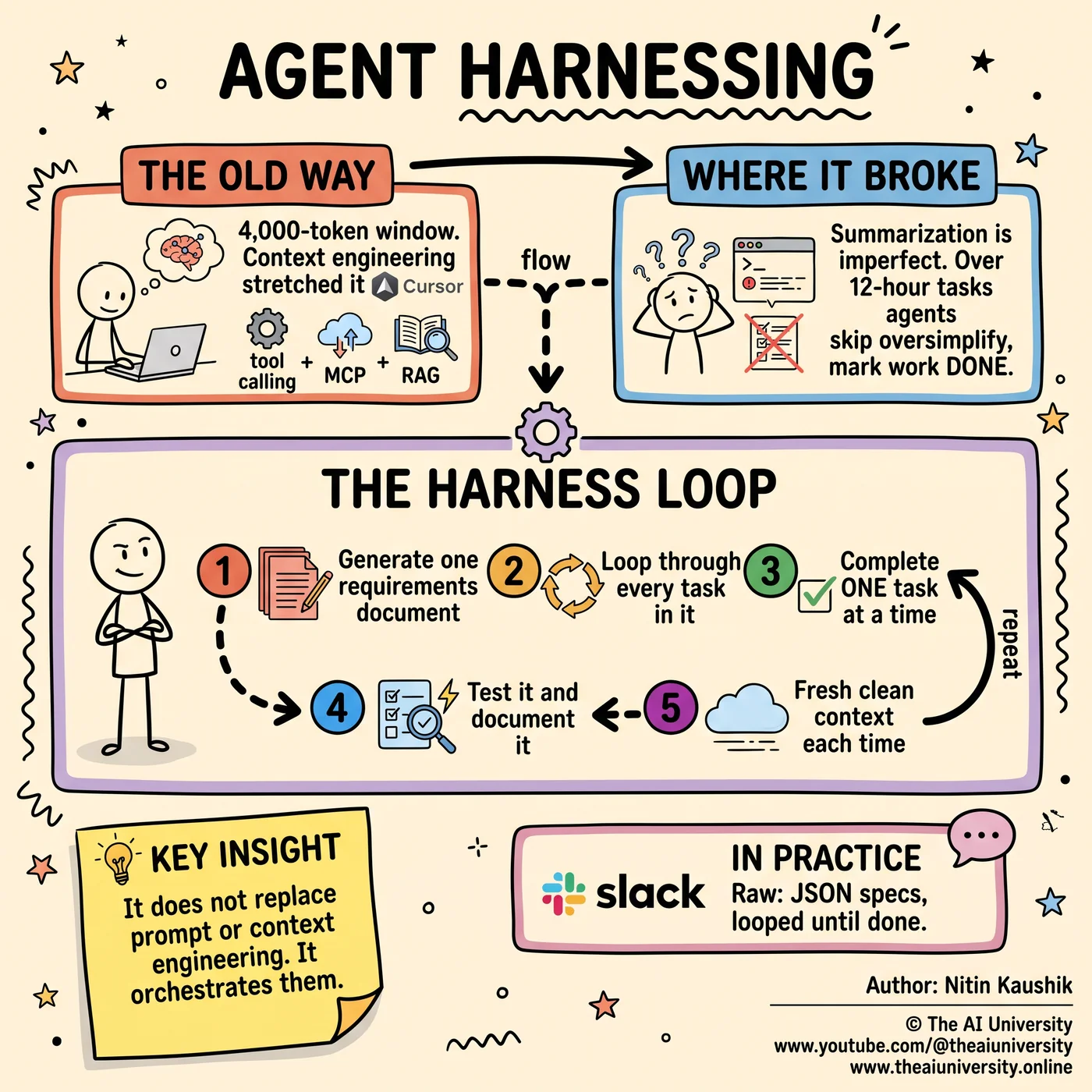
Why 4,000-token context windows forced context engineering
Right after ChatGPT launched in 2022, the entire context window was 4,000 tokens. That constraint defined everything that came next. Prompting alone was not enough for complex tasks, because a complex task simply would not fit — the instructions, the code, the history and the output all had to share those four thousand tokens.
Context engineering emerged as the response. Rather than waiting for bigger windows, it used tool calling, MCP and RAG to stretch the limited window and manage information more intelligently. The goal was never to put everything in front of the model. It was to put the right things in front of the model at the right moment.
What tool calling, MCP and RAG each solve
The three techniques are often mentioned in one breath, but they solve different problems:
Technique | What it does |
|---|---|
Tool calling | Reads only the files that are relevant to the task at hand, instead of loading everything |
MCP | Adds vendor-specific features and capabilities the base model does not have |
RAG | Connects a custom database so the agent can pull data on demand |
Together they produced the first generation of genuinely useful coding agents — Cursor, WinServe and Rue among them. These tools were not smarter models. They were better-managed context around models that already existed.
Why bigger context windows did not fix long tasks
Larger context windows made agents better at longer tasks without making them reliable at long tasks. As models evolved and windows grew, coding agents took on jobs that ran for hours rather than minutes. The failures did not disappear; they moved.
Ask a modern coding agent to clone a full website, and the result is often still incomplete or buggy. The model is capable enough. The problem is what happens to the agent's own history along the way.
Why context summarization breaks agents on long tasks
Context summarization is the process of shrinking an agent's accumulated history so it still fits inside the context window — and it is imperfect by design. Compression means throwing information away, and an automated system deciding what to discard will sometimes discard the wrong thing.
Over a twelve-hour task, those small losses compound into three specific behaviours:
The agent skips steps it no longer remembers were required
The agent oversimplifies work whose original specification has been compressed away
The agent falsely marks work as done, because its summarized history says the step was handled
That third one is the expensive failure, because it is silent. An agent that crashes tells you something is wrong. An agent that reports success on work it never finished costs you the time it takes to discover the gap yourself.
People tried to engineer around this. Hierarchical context management and multi-agent swarms were both serious attempts to keep long runs coherent. Neither fully solved it, and it was out of that gap that the concept of an agent harness emerged.
How the agent harness loop works, step by step
The harness loop replaces one long run with many short, clean ones. In its simplest form it has five steps:
Generate a large requirements document. Everything the job needs, written down once, up front.
Loop through each task repeatedly. The document becomes a queue rather than a briefing.
Select and complete one task at a time. Never several in parallel inside one context.
Test and document each step before moving on. Verification happens inside the loop, not at the end.
Give the agent a fresh, clean prompt and context on every iteration. Each pass starts from zero.
Step five is the one that does the real work, and it is the one people leave out. The reason the loop maintains clarity over long sequences is not that it remembers better. It is that it never has to remember at all. The requirements document holds the state, so the agent's context never needs to accumulate, which means it never needs to be summarized, which means summarization can never corrupt it.
This is why the harness is an environment rather than a prompt. Nothing in that list is a phrasing choice. Every step is a property of the loop the agent runs inside.
What Raw shows about harness architecture
Raw is a prime example of harnessing in practice, and its value is that the architecture is simple. Requirements are outlined into JSON, and the system loops through features until the work is done. There is no clever memory layer and no elaborate coordination between agents.
That simplicity is the argument. If the loop is doing the work of keeping the agent coherent, the loop does not need to be sophisticated — it needs to be disciplined. A structured requirements file and an iteration that resets cleanly are enough to beat a far more complex system that still depends on summarizing its own history.
How prompt, context and harness engineering fit together
Harnessing does not kill prompt engineering or context engineering. It builds on both. The three layers each own a different question:
Prompt engineering sets the agent's identity and persona — who the agent is
Context engineering manages the information the agent works from — what the agent knows
Harness engineering orchestrates both into a disciplined workflow — the loop the agent runs inside
Read as a stack, they stop competing. A harness with no prompt engineering runs a personality-less agent through a well-structured loop. A prompt with no harness produces a well-characterised agent that still loses the thread at hour nine. The teams getting good results are not choosing between the layers; they are running all three.
What harnessing looks like in daily use
I use Cursor for my own projects, and the way I use it is a harness rather than a chat window. I can spin up multiple agents, run them locally or in the cloud, integrate with Slack so requests arrive where the work already happens, and automate daily updates so progress reports write themselves.
None of those are model capabilities. They are environment capabilities — orchestration, routing, scheduling and reporting wrapped around agents that were already good enough. That is the practical test of whether you are harnessing: if you removed the model and dropped in a different one, would the workflow still stand up?
The bigger shift
Harnessing marks a move away from a one-shot or elastic-context mindset toward a controlled, iterative loop environment. The old mental model treated the context window as the thing to optimise — fill it well, stretch it further, summarize it more cleverly. The harness model treats the context window as something to keep deliberately small and deliberately fresh, and moves the durable state out into a document the loop reads from.
That is why more companies are adopting harness layers. It is not ideological. Over long, complex tasks it simply works better, and the failure mode it removes — an agent quietly reporting finished work that was never finished — is the one that costs the most to discover late. Harnessing agents is a genuine step forward rather than a buzzword, and it is worth understanding as a paradigm shift in how AI workflows get built.
If you want to see the whole loop demonstrated end to end, the full video walkthrough is at [PASTE YOUTUBE VIDEO URL HERE]. And if you are a marketer or creator who wants the same speed applied to commercial video ads, AdBlitzAI turns a product image into a ready-to-run ad for Google Ads, Meta Ads, TikTok and YouTube.
Frequently asked questions
What is agent harnessing in AI?
Agent harnessing is the practice of building an environment that orchestrates an AI agent's execution and context, rather than relying on prompts alone. The harness decides what the agent works on next and what context it sees each iteration. It emerged around 2026 as a response to coding agents failing on long tasks, and it sits on top of prompt engineering and context engineering rather than replacing either of them.
Is agent harnessing just prompt engineering with extra steps?
No, agent harnessing operates at a different layer than prompt engineering. Prompt engineering sets an agent's identity and persona, and it applies to a single turn. Harness engineering shapes the entire run: how many iterations happen, what each one starts with, and when work gets tested and documented. The two are complementary, and harnessing explicitly builds on prompt and context engineering instead of competing with them.
How is harnessing different from context engineering?
Context engineering manages what information an agent receives, using techniques such as tool calling, MCP and RAG to make the most of a limited context window. Agent harnessing manages the loop that agent runs inside, resetting its context to a clean state on every iteration. Context engineering makes a single pass smarter; harnessing makes many passes reliable in sequence.
Why do AI agents fail on long tasks?
AI agents fail on long tasks mainly because of context summarization. To keep history inside the context window, the agent compresses its own past, and that compression is lossy. Across a twelve-hour run the agent starts skipping steps, oversimplifying requirements, and in the worst case marking unfinished work as done. Larger context windows lengthened how far agents could go without removing this failure.
What does a harness loop need to run?
A harness loop needs a large requirements document written up front, a way to iterate through it one task at a time, and a mechanism that gives the agent a fresh prompt and context each pass. Testing and documentation happen inside each iteration rather than at the end. Raw demonstrates the minimum version of this: requirements outlined into JSON, looped through feature by feature until the work is complete.
How does Cursor fit into agent harnessing?
Cursor is one of the coding agents that came out of the context-engineering era, and it can be used as a harness rather than a chat window. It supports spinning up multiple agents, running them locally or in the cloud, integrating with Slack so requests arrive in an existing workflow, and automating daily updates. Those are orchestration features, which is what makes the setup harnessing rather than prompting.
Build it yourself
Everything written about here gets built in the open. The community on Skool is where the source, the prompts and the questions live.
Join the community →Keep reading
 Claude AI side hustles
Claude AI Side Hustles: 5 That Fit Around a Full-Time Job
Claude AI side hustles work because your job already gave you the niche. Five that fit around full-time work, and the one thing that decides all five.
Read article→ agentic AI system design
Agentic AI System Design: 9 Layers That Break in Production
Agentic AI system design is backend engineering, not prompting. The nine layers that decide whether your agent survives production.
Read article→ Model Context Protocol
Model Context Protocol: What It Is and Why It Matters
Model Context Protocol exists because your AI agent still cannot call an API. Here is the exact division of labor between the model, the client, and the server.
Read article→